B How to Do a Premium Adjustment Due to Untimely Processing
|
Program |
Manual Section |
|
KidsCare Freedom to Work |
When a change causing a decrease in premium is reported and verification is received on or before the 25th day of the month for KidsCare or the last day of the month for Freedom to Work, the decrease in premium is effective the month following the month the change is verified. When a change is processed untimely and causes a delay in the decrease in premium, enter a premium adjustment back to the month following the month the change is verified.
NOTE This process is only for premium adjustments due to untimely processing. See What to do When You Receive a Premium Hardship Waiver Request for routing any KidsCare hardship requests to AHCCCS.
|
Step |
Action |
|
1 |
From the PMMIS main menu, key “FI631” in the “NTR” field and press ENTER. |
|
2 |
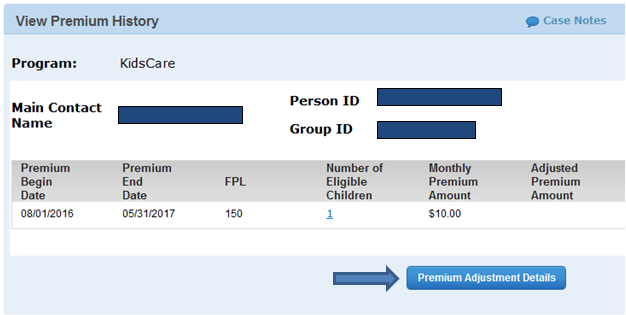
The View Premium History screen shows the main contact name, Person ID, Group ID, premium begin and end date, and premium amount. To adjust the premium due to untimely processing, click on Premium Adjustment Details.
|
|
3 |
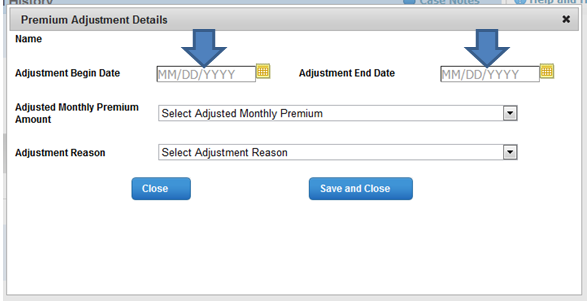
Select the adjustment begin date and adjustment end date on the Premium Adjustment Details pop up.
Example: The change was verified on April 23rd but was processed on July 14th. The decrease in premium would be effective August 1st. However, it should actually be effective May 1st. The adjustment begin date would be May 1st and the adjustment end date would be July 31st. |
|
4 |
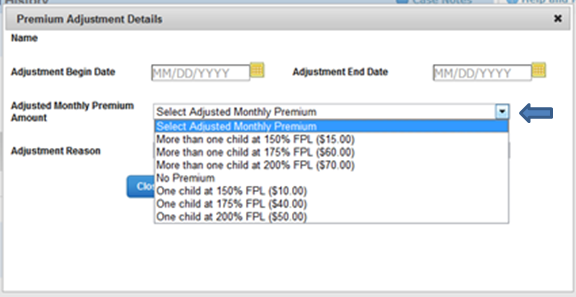
Select the adjusted monthly premium amount from the drop down list.
|
|
5 |
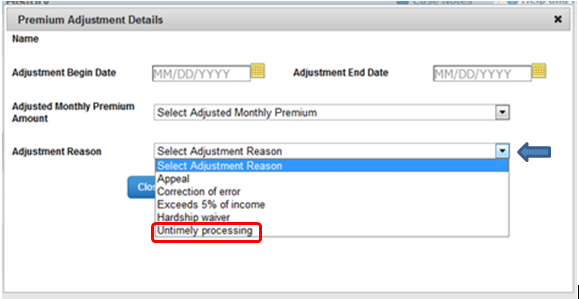
Select "Untimely processing" from the drop down list for the adjustment reason.
|
|
6 |
Save and close the Premium Adjustment Details pop up |